Shioaji Apps
Shioaji Apps lets you build your own trading interface — a market data dashboard, an order panel, or an internal workbench — with any frontend framework (React, Vue, Svelte, ...), powered by the local shioaji server's HTTP API and SSE streams. When development is done, build and upload it, and the server serves it directly at /apps/<name>/ — no separate web server needed.
Development — the frontend runs on its own dev server, and API requests are proxied to the shioaji server:
Browser ──▶ frontend dev server (:5173) ── proxy /api ──▶ shioaji server (:8080)
Deployment — after build and upload, both the frontend pages and the API are served by the shioaji server:
Browser ──▶ shioaji server (:8080)
             ├─ /apps/my-app/    your frontend pages
             ├─ /api/v1          market data, orders, accounting API
             └─ /api/v1/stream   SSE real-time streams
Create a Project
Scaffold a new project with the @sinotrade/create-shioaji-app template (requires Node.js 18+):
npm create @sinotrade/shioaji-app@latest
Follow the prompts to enter a project name. You can also pass a name directly and accept the defaults:
npm create @sinotrade/shioaji-app@latest my-app -- -y
What You Get
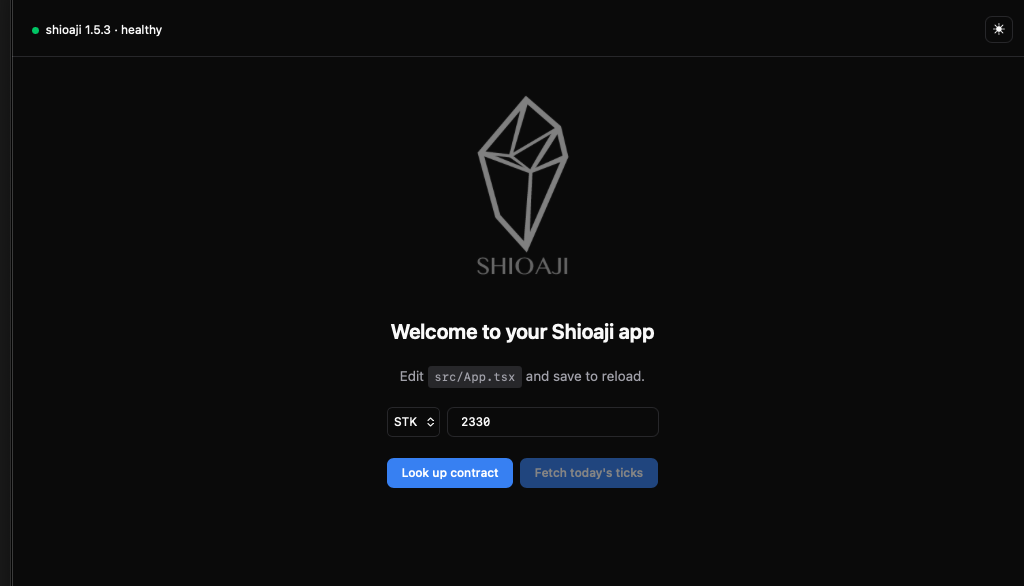
The scaffolded project works out of the box: the dev server already proxies /api to http://localhost:8080, and three integration examples are built in — a server health badge, contract lookup, and historical tick query.
my-app/
├── public/            static assets
├── src/
│   ├── components/    UI components (health badge, contract card, ticks table, theme toggle)
│   ├── hooks/         React hooks
│   ├── lib/           API calls, type definitions, utilities
│   ├── App.tsx        page composition — start editing here
│   ├── main.tsx       React entry point
│   └── theme.css.ts   theme tokens (light + dark)
├── index.html
├── vite.config.ts     dev proxy and base path settings
└── package.json
The stack is React 19 + TypeScript + Vite 8, styled with Vanilla Extract (zero-runtime CSS-in-JS), with a light/dark theme toggle.
Develop
Start the shioaji server first (simulation mode is recommended for development and testing):
shioaji server start
Then start the frontend dev server (the template already proxies /api to http://localhost:8080, no extra setup needed):
pnpm dev
Useful entry points during development:
| Entry | Description |
|---|---|
http://127.0.0.1:8080/docs |
OpenAPI docs — request/response formats for all HTTP endpoints |
http://127.0.0.1:8080/api/v1 |
HTTP API (market data, orders, accounting) |
http://127.0.0.1:8080/api/v1/stream/* |
SSE real-time streams (market data, order events) |
For request formats and examples of each feature, see the corresponding chapters: Streaming Market Data, Orders, Account Data.
Deploy to the shioaji server
Once the app is ready, deploy it in three steps.
Step 1: Build with /apps/<name>/ as the base path
After upload the app lives under /apps/<name>/, so asset paths must point there at build time (the template's vite.config.ts already supports the VITE_BASE environment variable):
In
VITE_BASE=/apps/my-app/ pnpm build
Out
vite v8.0.16 building client environment for production...
✓ 40 modules transformed.
dist/index.html                   0.52 kB │ gzip:  0.30 kB
dist/assets/index-D5gZ3quM.css    4.57 kB │ gzip:  1.14 kB
dist/assets/index-CSAkhLhy.js   197.57 kB │ gzip: 62.29 kB
✓ built in 504ms
Step 2: Upload
In
shioaji apps upload --name my-app --dir dist
Out
name: "my-app"
files[4]: "my-app/index.html","my-app/shioaji-logo.png","my-app/assets/index-CSAkhLhy.js","my-app/assets/index-D5gZ3quM.css"
--dir recursively uploads the whole directory, preserving the subdirectory structure (like assets/ above). Alternatively, use --file for individual files (repeatable, mutually exclusive with --dir).
In
curl -X POST http://127.0.0.1:8080/api/v1/apps/my-app \
  -F "files=@dist/index.html" \
  -F "files=@dist/assets/index-CSAkhLhy.js;filename=assets/index-CSAkhLhy.js" \
  -F "files=@dist/assets/index-D5gZ3quM.css;filename=assets/index-D5gZ3quM.css"
Out
{"name":"my-app","files":["my-app/index.html","my-app/assets/index-CSAkhLhy.js","my-app/assets/index-D5gZ3quM.css"]}
- Open
http://127.0.0.1:8080/ - Find the Custom Apps card
- Select the built
distfolder in Folder mode (or switch to File mode for individual files) - Enter the app name and click Upload
Limits and behavior
- Total upload size per app is capped at 50MB (multipart upload)
- Relative paths of uploaded files are preserved; the app entry point is
index.html /apps/is a public route — no authentication required for browser access
Step 3: Open
http://127.0.0.1:8080/apps/my-app/
Manage Uploaded Apps
In - list
shioaji apps list
Out
apps[1]: "my-app"
In - delete
shioaji apps delete --name my-app
Out
deleted: "my-app"
In - list
curl http://127.0.0.1:8080/api/v1/apps
Out
{"apps":["my-app"]}
In - delete
curl -X DELETE http://127.0.0.1:8080/api/v1/apps/my-app
Out
{"deleted":"my-app"}
Safety Notes
Production mode sends real orders
A frontend app can place orders directly through the HTTP API. Use simulation mode for development and testing, and clearly show the current environment in your UI (check the simulation field of GET /api/v1/info).
- Never put API Keys, Secret Keys, or certificates in frontend code or the repo — login is handled by the shioaji server's
.env, and the frontend never touches credentials - Order actions should require a confirmation step or a safety lock to prevent accidental clicks
- After an SSE reconnect, re-subscribe to the market data you need
Example Project: shioaji-pro-app
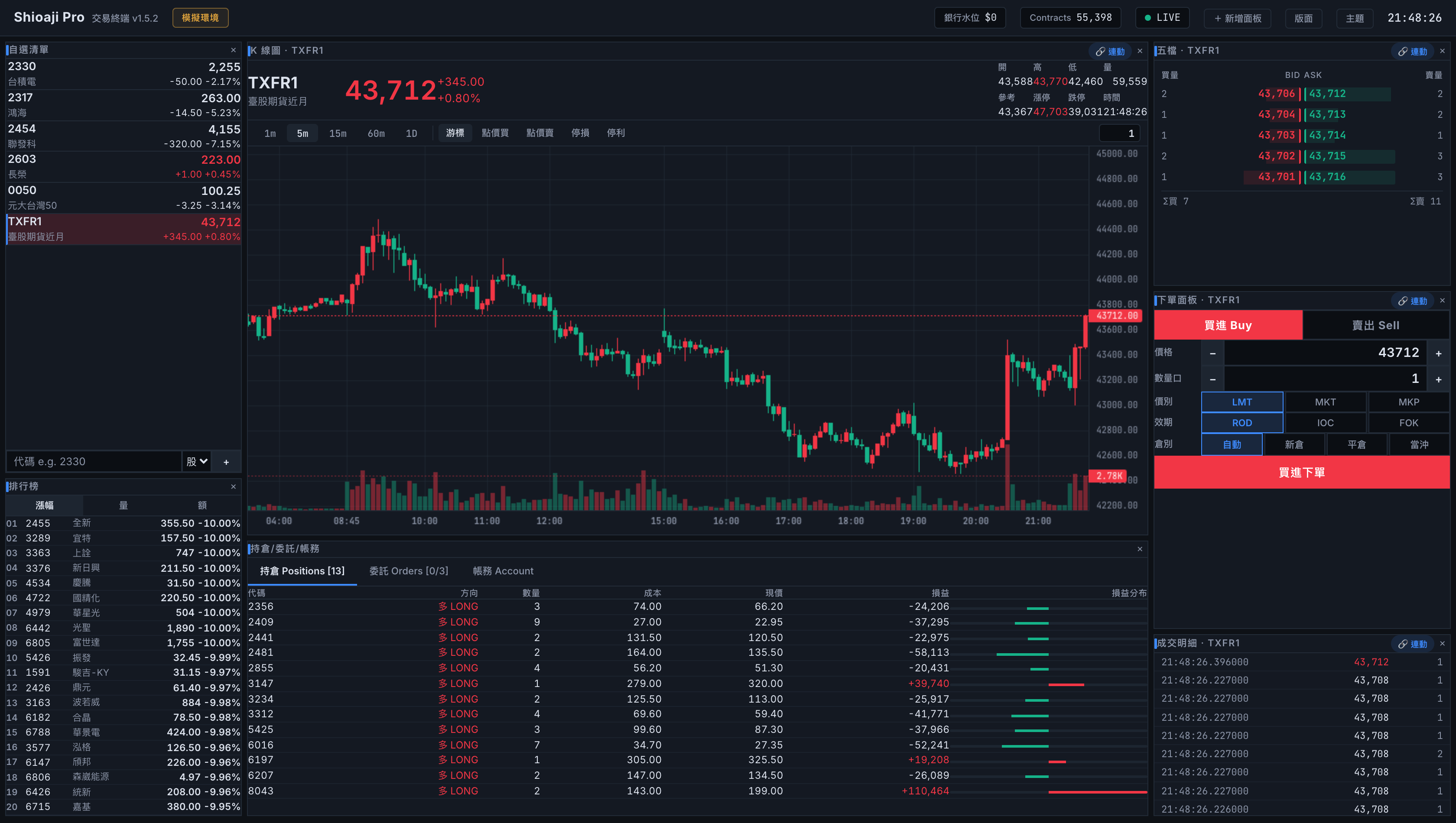
The shioaji-pro-app example demonstrates what kind of trading interface can be built with the HTTP API and SSE introduced on this page:
- Real-time K-line:
data/kbarsfor history,stream/dataSSE for live updates - Order events: subscribe via
auth/subscribe_trade, then consumestream/data/order_event - Click-to-trade / drag-to-reprice:
order/place_order,order/update_price
Disclaimer
- This project is an open-source example, not an official Shioaji product.
- The software is provided "AS IS" without warranty of any kind, express or implied; it may contain bugs, delays, or unexpected behavior, and ordering or automation features may fail due to defects, network interruptions, or market data delays — test thoroughly in simulation mode before use.
- It does not constitute investment advice; all trading decisions and losses are the user's own responsibility, and the project authors, contributors, and SinoPac Securities accept no liability for any damages. Markets carry risk — trade carefully.